Tom Sawyer Planning, part of the Tom Sawyer Digital Engineering product suite, is a visual planning application for defining and managing strategic initiatives, products, features, releases, teams, and their dependencies within a shared planning model. Unlike conventional planning tools that rely primarily on linear Gantt charts, Tom Sawyer Planning uses powerful graph and data visualization and analysis to show complex plans as interconnected, nested drawings that reveal hierarchy, flow, and dependency relationships.
Tom Sawyer Planning gives product managers, program leads, and project teams greater visibility into complex plans so they can understand dependencies, coordinate work, assess change impacts, and make better-informed planning decisions.
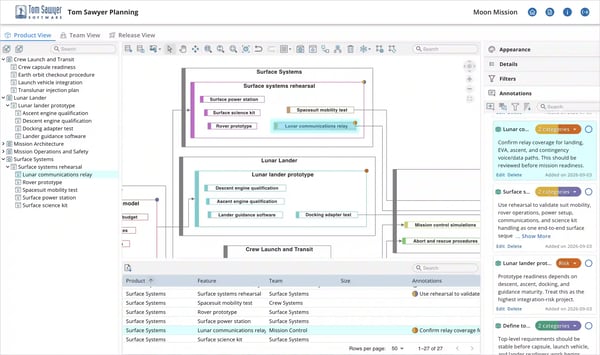
Tom Sawyer Planning enables complex planning for dependency and change-impact analysis.
Complex projects need more than a timeline

Planning a complex project means coordinating more than tasks and dates. Multiple teams contribute to shared milestones, products depend on other products, and work often spans several releases. A change in one area can affect commitments across the entire program.
When planning information is scattered across spreadsheets and separate tools, those relationships are difficult to follow. Teams may understand their own responsibilities without seeing how their decisions affect others. High-level roadmaps become disconnected from detailed plans, and dependencies emerge only when they cause delays.
The challenge is keeping the whole plan understandable as it grows and changes, so teams can recognize conflicts, evaluate tradeoffs, and stay aligned on what needs to happen next.
Tom Sawyer Planning is designed for ambitious programs and the teams behind them
Build a battery factory
Align facility development with equipment installation and production-line commissioning. Program and operations teams can plan phased expansion, coordinate responsibilities, and understand the dependencies between site preparation and manufacturing readiness.

Make an electric car
Plan development across vehicle systems and software, connecting the work of specialized engineering teams. Product managers and engineering leads can coordinate shared components across vehicle programs and align their delivery with planned releases.

Launch a rocket
Bring subsystem development, integration, and testing milestones into a coordinated program plan. Aerospace program leads can understand how work across engineering teams fits together and how a change to one component may affect launch preparation.
The Product view provides structured feature planning
Create a project with products and features, capture high-level effort estimates, create upstream and downstream dependencies, and organize features within the planning hierarchy.
Quickly build and refine plans while maintaining the relationships among planning elements.
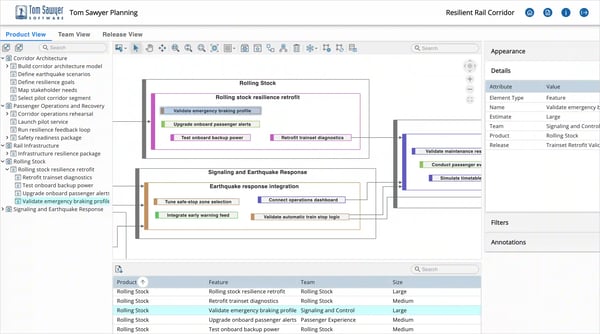
The Tom Sawyer Planning Product view brings structure to complex plans so teams understand feature dependencies.
The Team view provides team and resource coordination
Define teams and assign features to the teams responsible for delivering them.
Visualizing work by team helps you understand ownership, identify dependencies that cross team boundaries, and evaluate how changes to the plan may affect other teams.
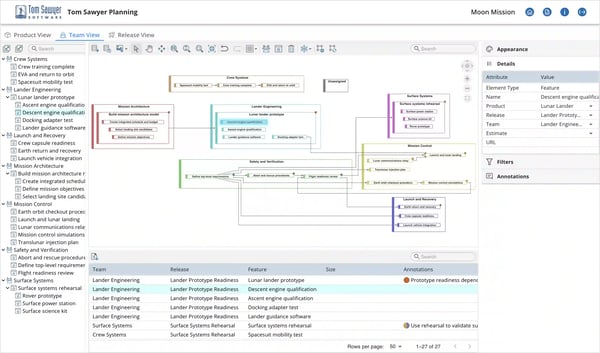
The Tom Sawyer Planning Team view clarifies ownership and improves coordination across teams.
The Release view provides release-oriented planning
Create releases and assign products and individual features to them. A dedicated release view makes it easier to understand what is planned for each release, see relationships across release boundaries, and adjust timing and assignments as priorities change.
Organize the Release view using either vertical or horizontal swimlanes to match different planning and presentation needs. Dependencies remain visible across swimlane boundaries, helping you understand how work spans releases and where schedule or sequencing changes may have broader impacts.
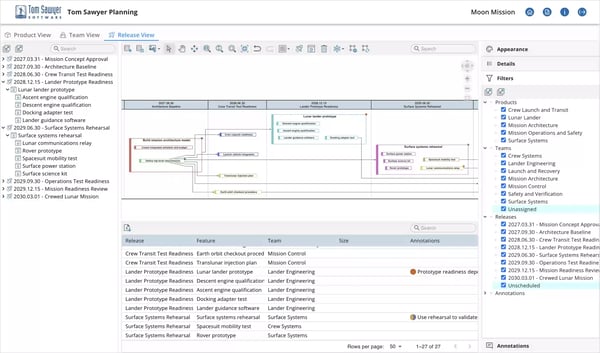
The Tom Sawyer Planning Release view keeps planned releases aligned with changing priorities.
Add context and clarity to your planning views
Annotations capture planning context
Tom Sawyer Planning provides a graph commenting system for adding annotations to features, enabling you to capture your comments, decisions, questions, or other contextual information directly within the planning model. This helps keep important planning context associated with the work it relates to.
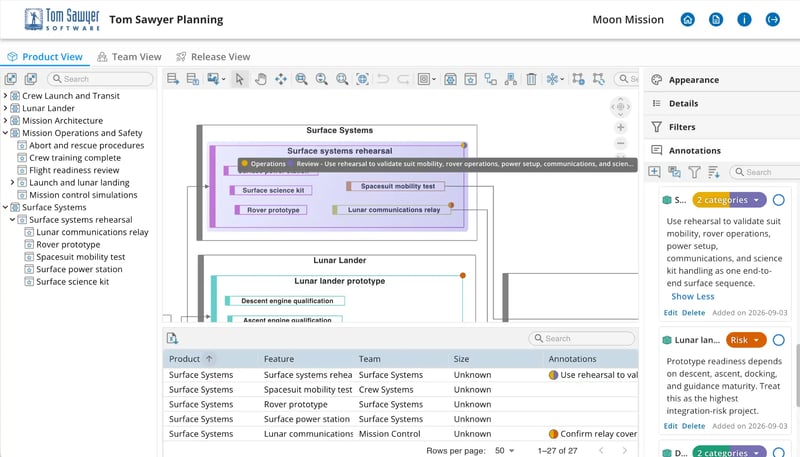
Tom Sawyer Planning annotations keep comments, decisions, questions, and other planning context connected to the work they relate to.
Flexible styling highlights what matters
Change node appearance based on team, release, estimate, or product to highlight different aspects of the plan. Visual styling makes it easier to recognize patterns, distinguish responsibilities, and focus on the information most relevant to a particular planning discussion.
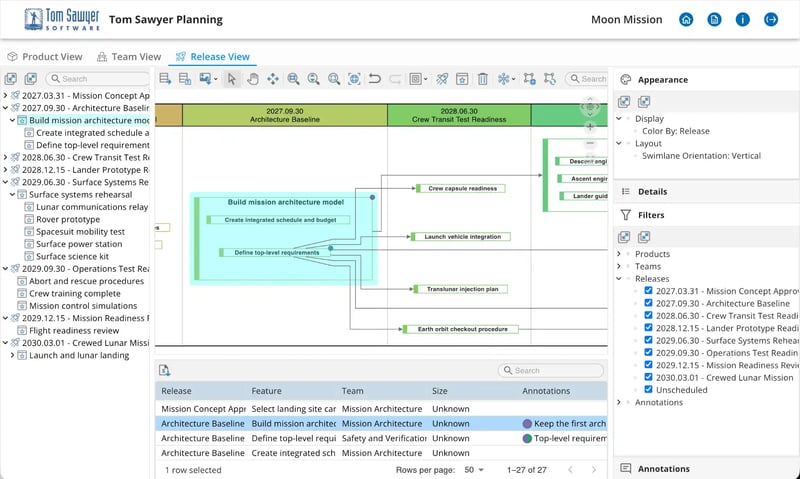
Tom Sawyer Planning visual styling helps teams highlight responsibilities, priorities, and patterns that matter most to the planning discussion.
Tom Sawyer Planning helps you move forward with greater planning confidence
Keep strategy connected to delivery
Maintain a clear connection between long-term initiatives and the products, features, and releases that advance them. Help teams understand not just what they are working on, but how it contributes to the larger goal.
Strengthen cross-team alignment
Give stakeholders a common foundation for planning discussions. Clarify how responsibilities and commitments fit together, reducing the effort needed to reconcile separate interpretations of the plan.
Adapt without losing the bigger picture
Keep complex plans understandable as priorities shift and new work emerges. Revisit affected commitments while preserving the context teams need to move forward together.
Make informed tradeoffs
Consider the broader consequences of changes to scope, priorities, or release plans. Evaluate decisions in the context of related work rather than treating each adjustment in isolation.
Identify planning risks earlier
Bring overlooked dependencies and competing commitments into view before they become delivery problems. Focus coordination where it matters most.